Sunday, March 13, 2011

Notes from the North

International Falls, MN is called "The Icebox of the Nation" for several good reasons.  

  1. 1. it's a damned cold place
  2. the government weather station officially proves it's damned cold
  3. the city owns the trademark "Icebox of the Nation"

The weather station is right next to the airport:

             48°34'N / 93°24'W.. INL

KEDA runs a big ol' 'fridge for those of us who just can't get cold enough.  Ask for Paul, tell him Dixie sent you.  Entertainment includes shivering, warm showers, alcohol, and good food.  Get the broiled walleye at The Spot on 53, coffee at The Coffee Landing, and pretty much anything at Margarita's (Texas Fajitas were my favorite).

And tell the guys at The Viking Bar that the Kensington Stone is a hoax.

- nzvyyx

Sunday, February 6, 2011

The Tail Without The Rooster

Automotive transmissions need  friction.  Friction is a major player in getting you from one gear to another, because  friction is what forces different spinning parts to have the same  RPM.  And, because a career in engineering looks a lot like Sisyphus' career in landscaping, we engineers tend to complain.  A lot


Transmission guys love to complain about friction coefficient, and with good reason.  If you get the wrong kind of friction, those gear changes that you don't think that much about - they can turn into obnoxious events in your car.  Traditionally, we complain if the static friction coefficient is a lot higher than the dynamic coefficient.  It even gets its own name: "roostertail,"  because of the shape of the coefficient graph produced by an SAE-2 test.  


So, friction is good but "roostertail" friction is bad.  Here's a plot of simulated vehicle acceleration I created, and it's showing something that looks a lot like roostertail.  It's the little bump at the end of the shift, inside the red oval:


That looks like a roostertail friction effect.  The shift is doing its thing and then right at the end there's a bump.  Roostertail, my old frictional frenemy.

The only problem with this diagnosis is that my simulation doesn't include roostertail friction.  I know this for sure because I typed every line of it.  So where's the bump coming from?

Turns out there's plenty of ways to get a bump.  One of them is to get your shift and your converter K factor to fight it out..  Here's engine and turbine RPM, doing their gear shift thing.  Looks pretty good from here...


...but converter torque is NOT cooperating.  In fact it looks like my lookup tables flatlined, and if I had a more complete data set I betcha the bump would be worse.


So there you go, The Tail Without The Rooster.  And once again, thank you Octave.  


Also occurs to me those runs are probably a breakpoint in my simulation development, since I'm  porting my models into compiled C lately.  I'll still be using Gnuplot for visualization... but wow! looking back it's amazing how much work you can get done with Notepad++ & Octave.  On to Eclipse & MinGW now... 


- nzvyyx


Sunday, January 30, 2011

Extracting Events from Time Based Signals

Seems like I regularly re-discover how to debounce signals... so maybe if I... 1) write 'em down and 2) remember I wrote 'em down and 3) remember WHERE I wrote 'em down...  then I could copy off myself.  Ya that sounds like a good plan.  Here we go.


As usual this is all based on GNU (R)Oc(K)tave and since i don't think I've mentioned it yet:  Notepad++ is a great editor and it's free.


So.  Let's say we've got some time based data, maybe with some noise riding on top of it:  Here's a combination of sine waves with a 1kHz sample rate.


     % a fabricated signal and its time, at 1kHz sample rate
     signal = sine_wave_1 + sine_wave_2;                      
     t_ = linspace(1, length(signal), length(signal)) * 0.001;    


Furthermore, let's assume we want to extract a time window (or subset) of that data.  To do that we need a defined start point and a defined end point.  In data logging these are often called "triggers."

For simplicity I'll assume the time window of interest is associated with large values of the signal.  In that case, some simple threshold comparison logic is enough to synthesize a  two state or true-false signal that starts to rough out a time window of interest:

     % digitize the signal into a true/false state 
     signal_threshold = 1;                      
     state = (signal > signal_threshold);       


Hopefully it's clear that the noise is causing some rapid oscillation in my otherwise clean state signal.  I'll need to debounce those state transitions to get a clean pair of start and end triggers.

There's a variety of FOR loop constructions that could work, but array operations are a lot faster.  Octave has a bunch of powerful set operations, and pretty much any operator (subtraction, for example) accepts array arguments: 

     % find state transitions
     index = find(abs(state .- shift(state, 1)) > 0);
     t_transitions = t_(index);
     transitions = state(index);

Here I'm finding state transitions, meaning a difference from one point in time to the next:
  • The "difference of two points"  means subtraction.  I'm using  the  dot-minus form to explicitly indicate element by element subtraction (not required, but more informative)
  • The shift.operator slides the elements one  to the right (one due to the argument of 1).  This gives me a loop to loop difference without using  a FOR loop.
  • The find operator returns  the indices of array elements statisfying the defined logic; in this case, all calculation results greater than zero...
  • and with an abs operator - again operating on an array of calculation results - I catch both positive and negative results, that is, both rising and falling edges of my state signal.
The calculation I really need is the index; the others are there so I can plot the transitions.  In short, that one line calculation of index reduces the 500 points of the  state variable down to just eight data point candidates for a time window.

The last step is to define and apply a filter to get rid of the extraneous transitions, aka "debounce" the transitions.  The cheapest, fastest way I've found to debounce a signal is to look at it with a pair of human eyes attached to a reasonably prepared human brain.  I suspect there are more mathematically rigorous treatments but I doubt they're as efficient or universally applicable, and I maintain my way is pretty darn fast.  

So, glancing at the data I say to myself "the signal I'm looking for doesn't change any faster than, uh, 25msec."  That means there has to be 25milliseconds between valid state transitions, or at my 1kHz sample rate, a difference of at least 25 between array indices.  

The debounce logic below somewhat parallels the transitions logic, except in the domain of array indices instead of time or signal value.  The main reason to use indices is that it pairs a time with its value.

     % debounce, assumes 25msec threshold @1kHz... 25 reads
     debounce_index = find(abs(index .- shift(index, 1) > 25);
     index = index(debounce_index);
     t_events = t_transitions(index);
     events = transitions(index);


The green triangles indicate my guesses at a time window containing large values of the signal.  Those could be called "triggers," I've got them labeled as events. .  In case it's not obvious what's going on with the debounce, it uses the difference of consecutive indices of the detected transitions, and it ignores consecutive transitions unless they're "far enough away" from their predecessor.

So the process was 
  1. get a clean state signal, in this case based on the value of the input
  2. find the state transitions 
  3. filter out noise based on the indices of transitions 

Once you've got confidence that your filter is working, you can golf the code down to a couple of lines; after all you don't need to plot every intermediate step.  Hope that helps (at least, I hope it helps ME)... have at it!

- nzvyyx

Saturday, January 8, 2011

Get Git

My job has some wonderful variety... one day I'm scribbling equations, the next I'm freezing my a$$ off in a huge refridgerator at 40 below.  Those are two very different experiences (a statement offered without proof, which is left to the reader).

However, both produce records: handwritten notes from one and binary computer data files from another.  Storing records has always been a challenge; finding them again later is worse. I even wrestle with how to keep organized.  Almost any record is simultaneously a piece of data, a process, and a reference.
I'm fairly certain, though, that any record that required work should not get scrapped.  Ever.

For data I'm loving MySQL, but for processes I think I want a version control system.

Here's a concrete example, I have a simple system level math model of my product, a six speed automatic transmission.  It contains about 100 files.  This is microscopic compared to "real" version controlled projects but I still want:

  • insurance against breakage (due to my own actions)
  • availability as a reference or tutorial for other projects
  • easy parallel branch maintenance 

Looks to me like pretty much any version control system will get me most of that.  Unfortunately that kind of flexibility is not an advantage to a n00b like myself.

Here's how I picked Git:

1.  Git appears to work on a project version, rather than file versions

Most of the VCS options want to maintain a series of file patches that allow you to move from one version to the next (or previous).  The VCS process appears to be

  1. invent or "bless" an initial version
  2. check out copies of files, make changes to them, and
  3. check in the results and update the database

Transactional databases would probably do the same things for me, but diff tools etc are already built into good a VCS.  Neither one is going to like my habit of swapping information environments and tools, however.
Running a DIFF between an M script and a binary data file or compiled C doesn't sound meaningful.
Other VCSs want to track changes to files; Git's philosophy appears to be more like, track changes in a directory - not a great example but somewhat descriptive..

Git fundamentally looks more flexible.

2.  Git is a distributed system.

I'm trying to become more agile.  In my experience, centralized authority pretty much opposes agile.
For example, ten or fifteen years ago, some engineers would ask a secretary to type reports for them.  It was a serious bottleneck compared to today, where everybody types up their own garbage.

Similar comparisons are available from Labs & Shops environments, or the I.T. department, or pretty much any process where there's a limited number of people who are actually working as compared to the number of people requesting work.  There's a wide variety of parallels, at least philosophically, where a distributed model is more more productive and more robust than a centralized model.

Combining that observation with the expected level of management chain support... well, a distributed system makes more sense.

Git!

- nzvyyx

ps [update 1MAY11] 
I prefer NotePad++ for lightweight file editing (it grandfathers my OS-independent rule), and since Der Kompanie removed BeyondCompare I was forced to find another diff/merge tool:  DiffMerge won.


Given the trial-and-error work I did and the various Google sidetracks involved, I thought it might be helpful to post the resulting .gitconfig options that worked on my WinXP machine:


For NotePad++:

[core]
  editor = <your_personal_path_to>notepad++.exe
  whitespace=fix,-indent-with-non-tab,trailing-space,cr-at-eol
  autocrlf = false


For DiffMerge:

[merge]
  tool = diffmerge
[mergetool "diffmerge"]
  cmd = <your_personal_path_to>DiffMerge.exe --merge -- result=$MERGED $LOCAL $BASE $REMOTE
  trustExitCode = true


You can get all of that done via mutliple git config --global commands at the prompt, or you could just copy the stuff above directly into .gitconfig file directly (e.g., open it in Notepad++). 


If it works, then git mergetool should give you an option to open DiffMerge.  Good Luck!


- nzvyyx

Friday, December 31, 2010

the plan comes together...

The strength and flexibility of open source tools is staggering!

Gentle Reader, I receive raw binary data by the gigabyte.  I've gotten data from outside my company, with a request for help crunching it.  But this isn't my day job and my management chain doesn't support me.

No matter.  I'm a believer that the "simple model/lots of data" method is one good tool for problem solving.  If nothing else, the challenge of do Lots with Nothing is a lot of fun!  And, after some effort, I think I have a fairly solid solution.  no Matlab seat and no more Random Access crashing.

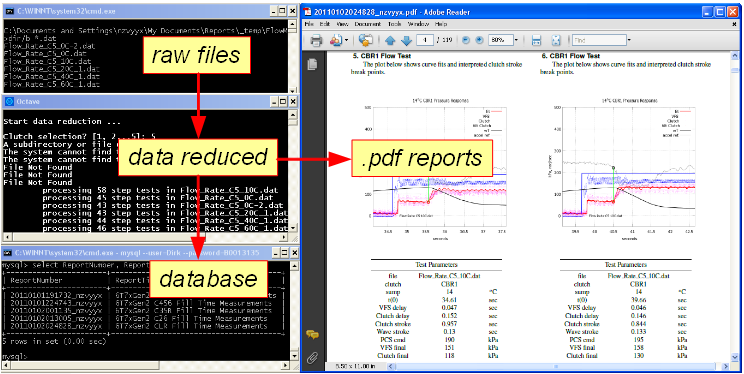
The chart below shows my process.  Each of these chunks works, beginning with raw binary .MDF files, through the waltz of perl, perl, Octave, SQL, TeX and a small C utility (thanks again, Tim!  much better than my perl script).  At the end I get slick  looking  .PDFs and a couple thousand rows in my database!

I figure the three or four people out there who are interested in this kind of stuff are either now wiping the drool off their chins, or laughing at my totally hacked together solution.  Feel free to laugh it up but keep in mind this is MY blog, scoffers!


and Happy New Year to you!

Screen shots of various chunks.  Octave system calls summon the MDF shredder, perl and MikTeX's pdflatex so those parts don't get their own window:


- nzvyyx

22JAN2011 edit:  Tim the Mighty pointed out I should be using his .OCT file instead of calling the .EXE.  Good point Tim!  I had been using a perl script and I had no choice; unfortunately I didn't re-evaluate that process when I started using his SignalExtractor.  Now data pipes directly to variables instead of requiring a lengthy csvread() call.  Just goes to show you how a mental framework can steer one's judgement.  

Thursday, December 30, 2010

Leap to \LaTeX\

I don't write reports.  I train my laptop to write them for me.

The trusty data warehouse is doing its thing, and the robots are tirelessly generating data... time to revisit automated data reduction.  A couple of years ago I hacked together some perl and Octave to produce HTML/CSS reports... an ok solution but not ideal because HTML just doesn't match up..

Continuing my "right tool for the right job" mantra, here's a quick-n-dirty-n-kinda stupid Taguchi matrix comparing the suitability of some popular file formats for automated reporting.
So according to this, .TEX is the best format for my needs (and HTML that I've been using for years was the worst choice.  Woops!)  The short form on this decision is:
  • on my end (the source) it supports a variety of tools and has a stable, flexible format
  • for everybody else (aka the SINKS) .PDF is a polished product
There was just this one little problem, minor thing... but... you see... I know squat, about  \TeX\.  But after a day of poking around and making mistakes, I'm ready.  And suddenly the idea of merging thousands of data plots from two different reports, well, it makes me giggle.  Bring it on, Robots!

- nzvyyx

ps A big THAN-Q to ASME for their asme2e document class, and to TexMaker and MikTeX for doing a great job making PDFs

Wednesday, December 29, 2010

Free Range Office Apps

I think I've stabilized my data warehouse.  On the plus side I'm using standard tools with specified behaviors.  The not-quite-as-happy news is that at least one of the tools currently has issues:  OpenOffice.org.

OOo shows up because I've connected OOo's Base as the client to a MySQL server (yes, I am using a single laptop as both a client and a server).  OOo's Base seemed like a good option for dealing with manual data entry and generating reports, and via the excellent ODBC connector extension it was stupidly simple to get Base talking to MySQL.  MySQL seems rock solid, and the simple SQL i/o I needed had a short learning curve.  SQL scripts aren't too bad either. Oh and MySQL_Workbench gets honorable mention for initial setup.

However!  OpenOffice, with no extra effort on my part, appears to be leaking memory.  It's easy enough to shut it down and restart occasionally but OOo is hardly the M$Orifice Killer that the Linux fanboys would have me believe.  Here I've doubled its real memory usage just by opening and closing some stuff.  I've seen 500Mb, worst case.  Not enough of a hassle force me back to "Random" Access, but troublesome.  More to come.


- nzvyyx